• Resources
  • Blogs
  • Fake Payment APK Scams in India: How to Identify and Stay Safe

Fake Payment APK Scams in India: How to Identify and Stay Safe

Summarize with AI

A customer scans the QR code at your counter, shows a green success screen, and begins to walk away. It looks normal at that moment. Minutes later, you check your transaction history, and nothing appears. This is how a fake payment app trap usually plays out in retail shops across India, where speed and trust are part of everyday transactions.

According to the National Payments Corporation of India (NPCI) and the Ministry of Home Affairs cybercrime portal, fake payment confirmation scams are among the most commonly reported forms of digital payment fraud affecting small merchants.

The risk is growing because UPI is now part of daily buying and selling. In January 2026, UPI processed 21.70 billion transactions worth over ₹28.33 lakh crore, and 691 banks were live on the UPI platform. With volumes this high, scammers do not need to trick everyone. They only need a few people to accept a “paid” screen without real credit.

Fake payment confirmation scams have become a recurring form of digital payment fraud affecting small merchants and consumers. Safety advisories from the National Payments Corporation of India (NPCI) and reporting data from the Ministry of Home Affairs cybercrime portal highlight the importance of verifying payment credits inside the receiver’s own app before accepting a transaction as complete.

In many cases, a scammer uses a fake success display or pushes a shady install that imitates a familiar payment interface. The aim is to make you accept a “done” message without any real money reaching your bank. These scams fall under the broader category of digital payment fraud involving UPI transactions.

In this blog will learn how the scam works, why merchants get targeted, how to verify a payment in seconds, what habits reduce risk, and what to do fast if you face payment fraud.

What are Fake Payment Apps

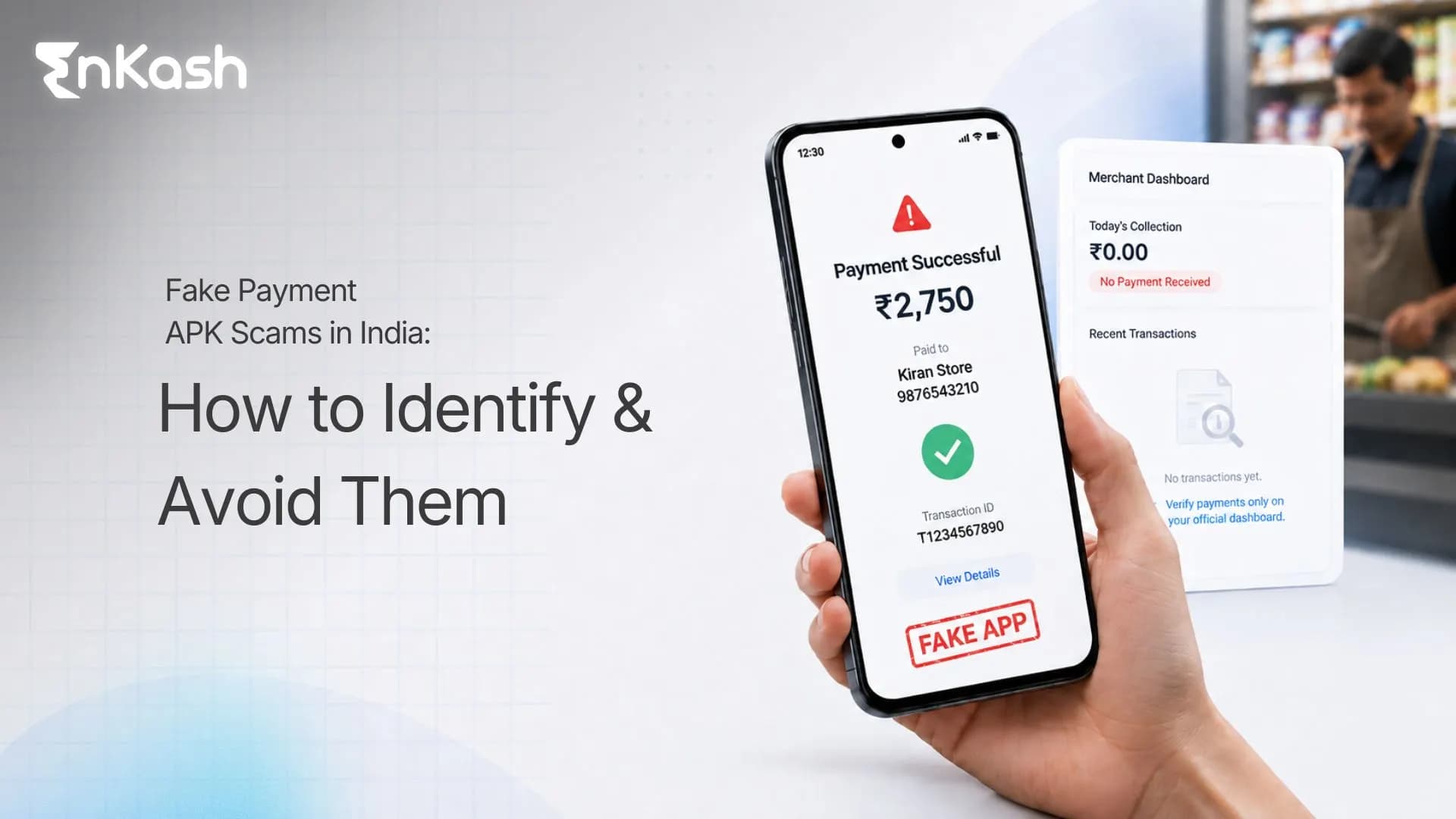
A fake payment app is a phone app designed to look like a real UPI or wallet app, with the purpose of misleading you. It can display a “payment successful” screen even when no money has moved. Many versions copy familiar layouts, colours, and buttons to feel believable at first glance.

In India, these scams spread through links shared on WhatsApp or Telegram, or through pages posing as customer support. A scammer may ask you to “install an update” or “use this app to complete the payment.” After installation, the app can mimic payment steps and confirmations, creating a false sense of completion. The screen looks convincing, yet the receiver never gets credited.

A simple rule helps here. Real payments create a record in your own UPI app history or bank account trail. Fake apps create visuals that imitate proof. When you separate records from screenshots, the scam becomes easier to spot.

Some traps involve a modified version of a known app shared as an unsafe install outside official stores. People call these “mods” in casual language. The name changes, yet the risk remains, because the app did not come through a verified route. This is treated as payment fraud because the loss can include goods, cash, and account access, all triggered by a single misleading screen.

Fake UPI Payments Explained: How the Scam Works

A fake UPI payment scam is built on the idea of making a payment appear successful on the sender’s phone, while the receiver gets no credit. The scam works best in quick, real-life moments when people rely on a screen rather than a verified record.

Step-by-step Flow of the Scam at a Counter or Handover

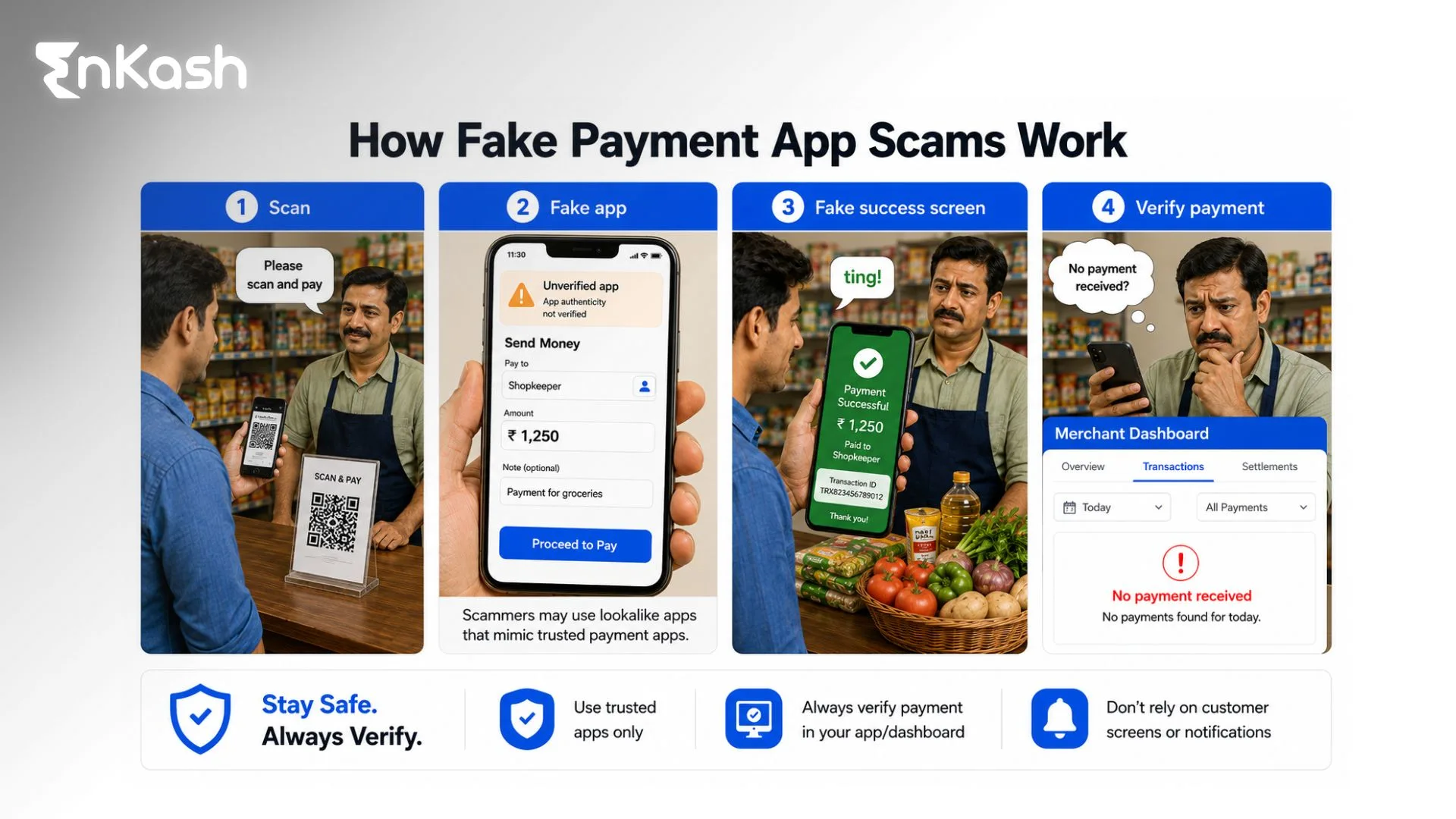
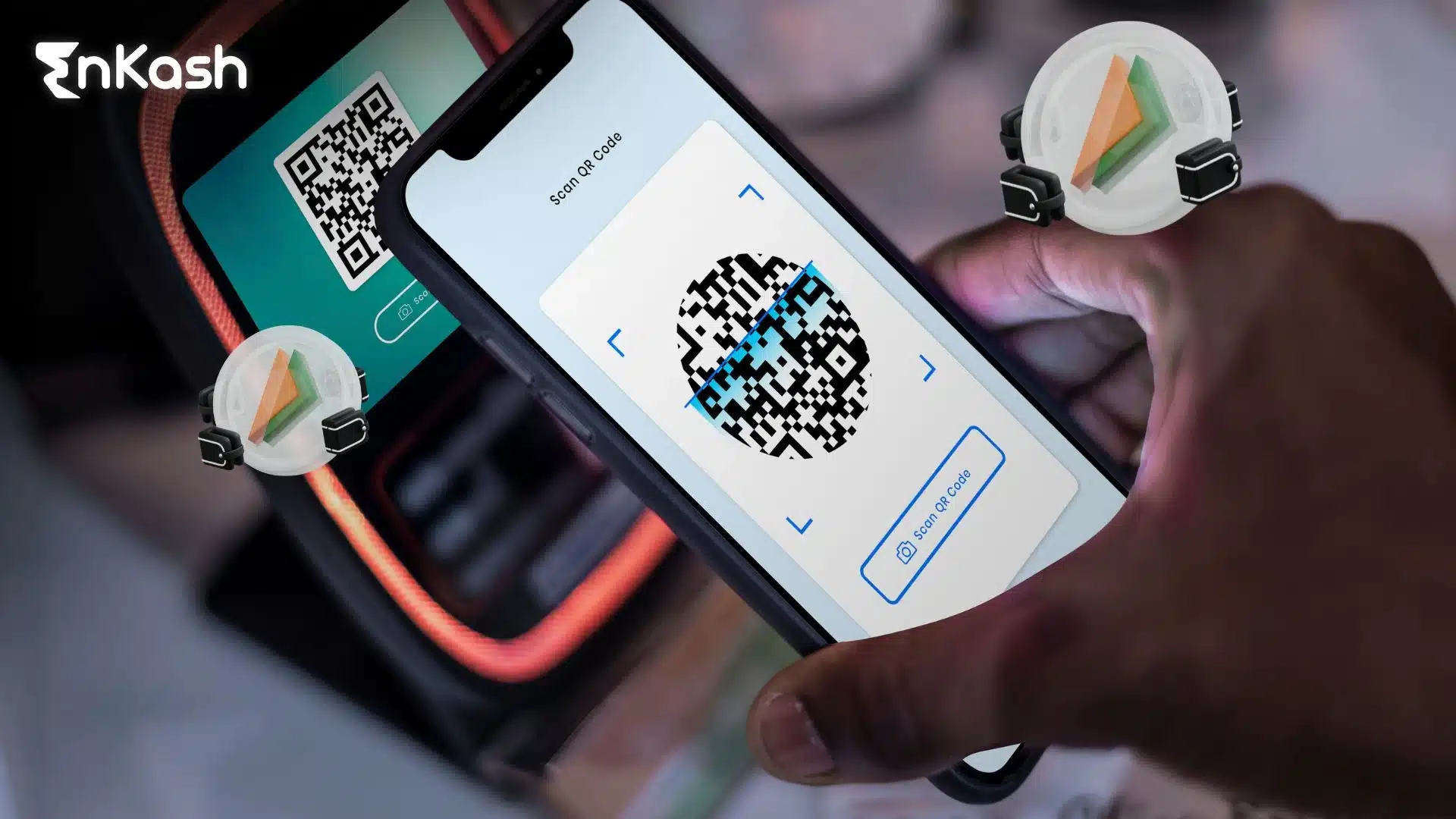
The scammer starts like a normal buyer. They scan your QR code or enter your UPI ID and act like they are paying. Within seconds, they show a “success” screen or a receipt-style page that looks genuine. They may add urgency by blaming the network and asking you to hand over the item first. The entire act is designed to end the transaction before you check your own payment record.

How Fake Confirmation Screens Replace Real Proof

A real UPI transfer creates an entry in the receiver’s transaction history and connects to the bank trail behind UPI. A fake payment attempt creates only visuals, such as a screenshot, a pop-up, or a success animation. If you accept the visual as proof, the scammer gets what they want without sending money. The loss is discovered only when you check and see no matching credit.

The PIN Confusion Trick that Turns Receiving into Sending

Some fraudsters use confusion around prompts and collect requests. They may trigger a request and describe it as a step to receive money. If the victim enters the UPI PIN, money can be debited from the victim’s account instead. This is where misleading labels, like a fake payment UPI app link, may be used to lower suspicion and speed up the mistake.

How Fraudsters Target Merchants

Fraudsters pick merchants who must move fast. They look for counters where staff cannot pause for checks without upsetting the flow of sales. A crowded shop creates the right conditions for PhonePe frauds and similar UPI tricks, because the fraud depends on speed and distraction.

They Strike When Attention is Already Divided

Peak hours increase risk. Lunch rush, evening traffic, weekends, and festival periods keep staff juggling billing, packing, and customer queries. Delivery handovers carry the same pressure because the parcel is already sealed and ready to be handed over. The fraudster tries to keep your eyes on their screen while your hands handle the order.

They Push Urgency to Block Verification

Many scammers speak with confidence and create a sense of time pressure. They claim the payment has been completed and suggest it will reflect in a moment, then ask for the item immediately. If a merchant hesitates, the scammer may argue, raise their voice, or trigger confusion at the counter. This pressure reduces the chance of a proper check and increases the chance of accepting a screen as proof.

They Focus on Categories with Instant Loss

Fast-moving items get targeted first: fuel, groceries, takeaway food, and courier parcels. These sales leave little room for recovery because the product is available for only a few seconds. Small shops also face greater exposure because owners handle multiple tasks at once, which reduces verification time and increases errors.

How to Detect and Verify a Fake Payment

A fake confirmation screen can look perfect. Proof comes from your own records, not the other person’s phone. The Reserve Bank of India also advises users to confirm transaction credits within their own bank or UPI app rather than relying on screenshots or payment confirmation screens shown by another person.
Here are simple methods to confirm whether a payment is real while you are still at the counter.

Use the 15-second Check Inside Your Own App

Open your payment or banking app and check the latest transaction entry. Look for the payment as a completed credit, with the correct amount. Match the time to the moment the customer claimed to have paid. If the payment does not appear as a successful credit, treat it as unpaid. This single habit prevents most fake UPI payment scams. Merchant safety guidance from NPCI also emphasises that the receiver should confirm the credit entry in their own UPI or banking app before releasing goods or completing a sale.

Match the Three Details that Scammers Cannot Fake on Your Side

When a payment is real, your app will show a clear trail. Check three things every time. Confirm the exact amount. Confirm the transaction status reads successful. Confirm the transaction ID (UTR), amount, and status match the payment you expected. Scammers can edit a screenshot on their phone, yet they cannot write a successful entry into your transaction history.

Reject “Proof” Formats that can be Staged in Seconds

Avoid making decisions from the sender’s screen. Screenshots, screen recordings, and receipt images can be edited quickly. A successful animation can be replayed. Even a notification banner can be fabricated through unsafe apps. Accept only what appears inside your own transaction list.

Handle Delays Without Handing Over the Product

Network delays happen in real payments, yet delays cannot replace confirmation. If the customer says it will reflect later, pause the handover. Ask them to wait while you refresh your history and confirm the credit. If they refuse to wait, treat it as a risk sign and end the transaction safely. This protects you from payment fraud that depends on urgency.

How to Prevent Fake Payments UPI Scams

Prevention is about reducing exposure before a scam attempt even begins. A strong setup at the counter and on the phone cuts risk, even during rush hours. This section focuses on habits and controls that work in day-to-day business, without relying on luck.

Merchant Counter Rules that Reduce Risk

Create one clear rule for every sale, and release goods only after confirmation inside your own system. Staff should follow the same rule every time, including for regular customers. Keep the QR display visible and fixed, and avoid scanning codes from a customer’s device. Train the team to slow the moment down when a customer pressures for instant handover. A simple line helps: “I can hand it over after the credit appears in my transaction history.” Consistent checks reduce the chance of a forced mistake.

Staff Training Cues that Stop Escalation

Scammers often attempt to create confusion at the counter. Staff training should include how to respond without arguments. Teach a short script, keep the voice steady, repeat the rule, and avoid long explanations. If a person raises their voice, staff should shift the conversation to a manager or move the transaction aside to protect the queue. A fraud attempt loses power when it cannot control the counter’s pace.

Phone Safety Habits for Consumers and Small Business Owners

Many scams begin with risky app installs. Avoid downloading payment-related files from messages, social media, or unknown links. Use official app stores and verified support channels. Review permissions on your phone monthly and revoke access for anything that does not align with the app’s function. If a file is described as a PhonePe MOD APK, treat it as unsafe by default and do not install it. These steps cut the risk of unsafe apps that mimic trusted interfaces.

Simple Controls that Reduce Day-to-Day Exposure

Use a screen lock and keep your UPI apps protected with device security. Keep business and personal payments separate when possible to make reviews easier. Set internal limits for staff handling high-value orders, such as requiring owner confirmation before releasing expensive goods. These controls make payment fraud harder to pull off because the scam needs speed and a single point of failure.

What to do After Receiving a Fake Payment

Speed protects evidence and reduces further loss. Follow a fixed order, secure your records and protect your accounts, and alert the right parties. Treat it as a financial incident and keep communication factual.

If You are a Merchant and Goods are Already Handed Over

Start by recording the details on your end. Note the exact time, bill number, amount, and the payment method the buyer claimed to use. Save chat messages and the phone number used. If your shop has CCTV, mark the time window and secure the clip before it overwrites. Ask the staff who dealt with the buyer to write a short note while their memory is fresh. Contact your bank or the payment provider linked to your QR code and report suspected payment fraud. Share the details you captured, along with any identifiers you have.

Avoid private settlement offers. Fraudsters may call later and promise to pay if you share an OTP or click a link. Treat any follow-up contact as a second attempt and limit interaction to collecting details for a complaint.

If You Installed a Fake App or Clicked an Unsafe Payment Link

Switch the phone to airplane mode to cut network access, then uninstall the suspicious app. Remove the suspicious app from the phone. Check whether device settings changed, including Accessibility access and screen overlay permission. From a safer device, change passwords for email and banking-linked accounts and review recent login activity. Inform your bank immediately if you notice any unknown debits or repeated attempts. If you entered a UPI PIN during a suspicious prompt, reset it through your bank’s official flow and monitor the account closely for the next few hours.

Cyber Crime Reporting for Fake Payment Scams in India

The Government of India operates a dedicated system for reporting financial cyber fraud. Victims can report incidents through the National Cyber Crime Reporting Portal and the helpline number 1930, both managed by the Ministry of Home Affairs through the Indian Cyber Crime Coordination Centre (I4C).

Once you have secured your details, file an official report through India’s cyber fraud channels. Reporting through the right channel increases the likelihood of prompt action and creates a formal record for follow-up with your bank and payment provider.

Use the National Helpline for Financial Cyber Fraud

Call 1930 as soon as you can. Share the amount, time, and the account or UPI details involved. Keep your bank name and the app used ready. If you have the scammer’s phone number, share it as well. The operator may guide you on the next steps and the type of complaint to file.

File the Complaint on the National Cyber Crime Reporting Portal

Go to cybercrime.gov.in and file a complaint under online financial fraud. Enter details carefully, including the transaction reference information you have, the UPI ID or QR details, the time of the incident, and the contact number used by the fraudster. Upload supporting files, such as screenshots, chat logs, invoices, and CCTV stills where available. Keep the acknowledgement or reference number safe for bank communication.

What Information Helps Investigators and Banks Act Faster

Provide clean, structured facts. Include the date and time window, the exact amount, your UPI handle, the channel used by the fraudster, and any device or app details if an unsafe install occurred. Avoid adding assumptions. Clear facts reduce back-and-forth and help the complaint move faster.

Report once through official channels and avoid sharing complaint details publicly. Fraudsters sometimes pose as recovery agents and request OTPs or remote access after a complaint is filed. Treat any such contact as suspicious and rely only on verified bank and portal communication.

Fake Payment Apps vs Authentic Apps

Most people check the payment after a problem happens. A safer approach is to verify the app source before installation. The points below give a simple pre-install framework to spot fake apps and avoid unsafe downloads.

Signals that Usually Point to an Authentic App

Start with the source first. Install payment apps only through official app stores and verified publisher listings. Check the publisher name carefully and confirm it matches the company you expect. Review the update history and support information, since trusted apps maintain consistent details across versions. Use help links found inside the official app or on the company’s official website, rather than phone numbers listed on random pages.

Signals that Usually Point to a Risky or Fake App

Treat any app pushed through a message link as high risk. Be cautious when someone insists on an “urgent update” file or claims a download is required to complete a payment. Watch for small brand name changes, odd spellings, duplicate icons, or unfamiliar developer names. Be cautious if the app asks for intrusive permissions at install time, including Accessibility access or the ability to appear over other apps. These signals often appear in cases tied to a fake payment app install.

A Simple Decision Rule Before You Install

If you cannot verify the source quickly, avoid the install. Use a safer route, search the official store listing yourself, or visit the official site and use its store link. If the person pushing the install becomes impatient, treat the behaviour as a risk sign. Many payment fraud cases start with a rushed install and end with fake payment loss.

How EnKash Helps Prevent Frauds

EnKash can reduce business payment risk by enforcing rules before money moves. Its Approval Flows let companies set custom workflows for payments and expense requests, with role-based permissions, policy enforcement, and alerts when submissions breach limits. It also supports controlled, pre-approved spend limits and real-time UPI transaction tracking inside the expense suite.

For payables, EnKash offers vendor payment workflows with ERP integrations such as Tally, QuickBooks, and Zoho, improving reconciliation and reducing manual errors. Teams get real-time visibility into approval status for accountability.

Conclusion

UPI has made payments fast in India, yet speed also creates openings for fraud. Fake payment scams work because they push you to trust a screen instead of your own records. A clean habit at the counter fixes most of it, confirming the credit in your transaction history before any handover. Pair that with safer install behaviour, because a fake payment APK can turn a simple checkout trick into deeper account risk.

If a scam attempt happens, act with discipline. Preserve evidence, alert your bank or payment provider, and report through the official cybercrime route without delay. Do not engage with strangers offering quick recovery or support over calls and links, because follow-up scams are common.

The safest approach is consistency. When your checks are routine, pressure stops working. When your installs come only from verified sources, fake apps lose their entry point. Keep those basics tight, and a fake payment UPI app becomes far easier to spot, stop, and report.

FAQs

Why do fake payment scams succeed even when the app screen looks real?
Scams succeed because the screen is designed to look convincing during busy moments. Many people treat a green tick, sound, or receipt image as proof. Real proof exists only inside the receiver’s transaction history or bank record. Fraudsters rely on haste, pressure, and distraction.

What should a shop staff member do when a customer argues and creates a scene?
Move the transaction aside and keep the queue flowing. Repeat one fixed rule: goods are released after confirmation in the receiver’s record. Avoid debating screenshots or promises. If the person escalates, involve the manager, note the time, and preserve CCTV footage for later reporting.

What details should merchants capture immediately after a suspected fake payment?
Record the time, amount, bill number, and the payment method the buyer claimed to use. Save any chat messages and phone numbers. Preserve screenshots sent by the buyer and secure CCTV clips with timestamps. Write a short staff note describing the interaction while memory is fresh.

Why are courier handovers and doorstep deliveries high risk for fake payment tricks?
Handover points create urgency because the parcel is ready and the delivery person has a tight route. Fraudsters use speed to stop verification. The victim often checks later, after the person has left. A fixed handover rule and a quick record check reduce the exposure.

How do scammers use fake customer care pages to push unsafe installs?
They publish numbers and links on lookalike pages that appear in searches or ads. They ask for an “update” or “account fix” and send a download link. The install creates trust through familiar branding. After that, the scam can move into fake confirmations or account access.

What phone settings should be reviewed after an unsafe app install attempt?
Check for unfamiliar apps, then review Accessibility access, screen overlay permissions, notification access, and device admin settings. Look for new permissions granted recently. Remove access that does not fit the app’s purpose. Change account passwords from a safer device and monitor banking activity.

What should small businesses train new staff to do during UPI rush hours?
Train one habit and enforce it without exceptions: verify credits only in the receiver’s system. Give staff a short script to handle pressure and a manager escalation path. Teach them to pause handovers during delays. Add a daily closing routine to reconcile suspicious transactions quickly.

Why do some scams involve a collection request or prompt that looks like receiving money?
Fraudsters exploit confusion around prompts. They frame a request as a step to receive funds and push the victim to enter a UPI PIN. Entering the PIN authorises a debit, not a credit. Clear training and careful reading of prompts prevent this mistake.

What should you do if you suspect someone used a fake receipt to take goods?
Stop further handovers for that person and secure evidence immediately. Document the bill, time, item details, and any contact number. Inform your payment provider and bank of the facts. File a cyber fraud report through official channels, then share the acknowledgement with your bank.

How can families reduce the chance of a fake payment scam affecting shared devices?
Set device locks and keep payment apps protected with strong security settings. Avoid installing apps from message links. Teach children and elders to ignore urgent “update” messages and unknown support calls. Review installed apps monthly, remove suspicious ones, and keep official apps updated.

Don't forget to share this post

Sakshi Kumari

Sakshi is a Content Writer at EnKash, specializing in finance and the digital payment ecosystem. With a background in literature she brings clarity and structure to complex financial concepts, translating them into precise and accessible insights for businesses and finance professionals.

Subscribe to get updates

Related Blogs

[enkash_exit_intend_form_shortcode]