A customer shows a successful payment screen, but the money does not appear in your records. Should you hand over the order or wait? Before releasing goods, completing a service or issuing a refund, check the transaction in your own bank account, UPI app or merchant dashboard. A screenshot alone cannot confirm that you have been paid.
Fraudsters can edit receipts, reuse older screenshots or display false success screens through spoof payment apps. Familiar logos, correct amounts and convincing transaction IDs can make these confirmations difficult to judge by appearance.
The Ministry of Finance reported 12.64 lakh UPI payment-fraud incidents involving ₹981 crore in FY 2024–25. These figures cover broader UPI fraud, not fake screenshot scams alone, but underline the importance of checking payment records before acting on a customer’s confirmation.
Here is how to recognise suspicious payment proof, verify the transaction and respond if a fake screenshot causes a loss.
What is a Fake Payment Screenshot Scam?
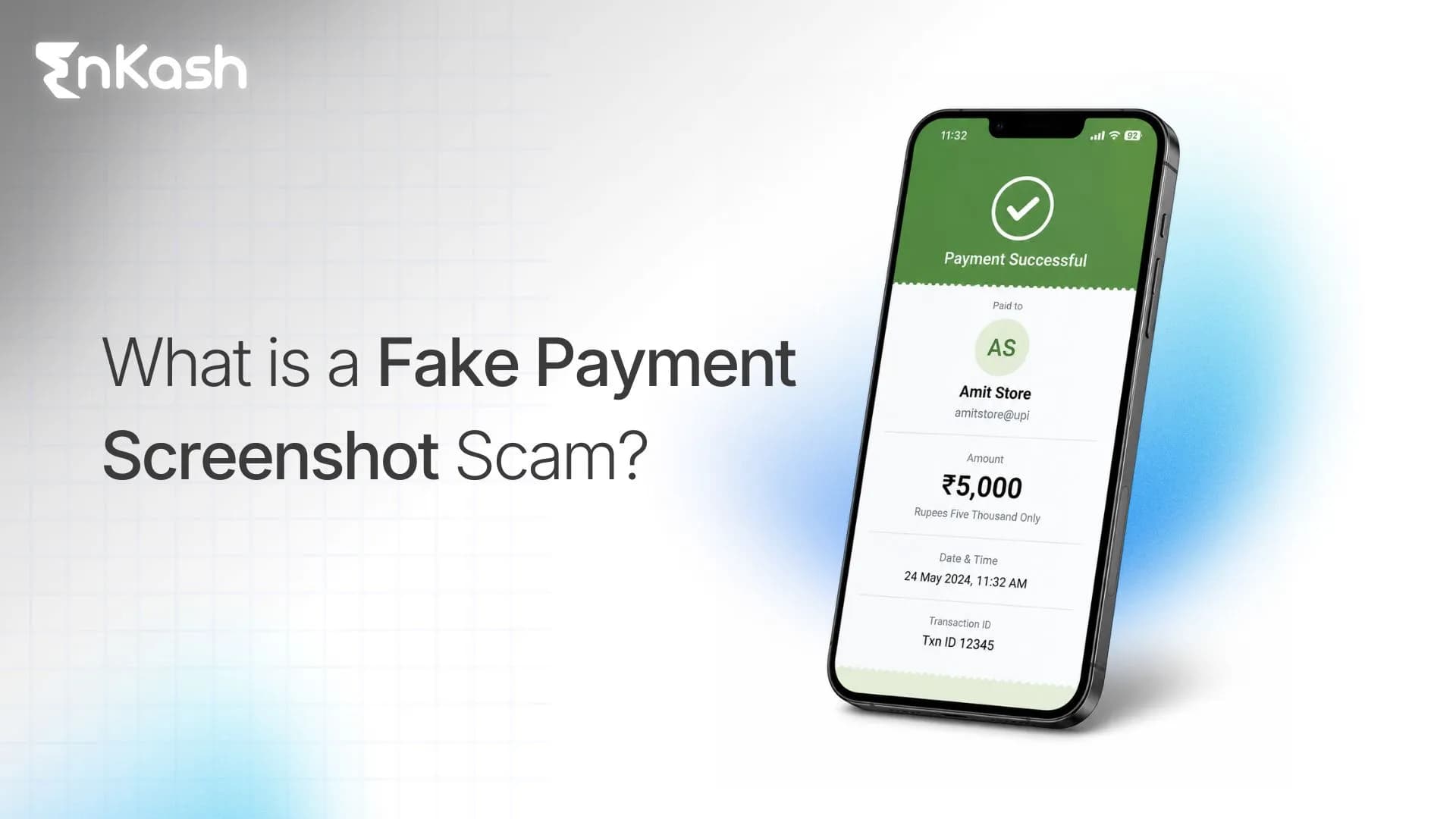
A fake payment screenshot scam happens when someone shows or sends a false payment confirmation to make another person believe that a digital payment has been completed.
The screenshot may display:
- A successful payment message
- The merchant's name
- The correct payment amount
- Date and time
- A UPI transaction ID or reference number
- Branding similar to PhonePe, Google Pay, Paytm or another payment app
The information can look genuine even when no payment was made.
These scams commonly affect merchants, restaurants, delivery businesses, freelancers, online sellers and anyone who supplies goods or services after receiving digital payment proof.
How Does a Fake Payment Screenshot Scam Work?
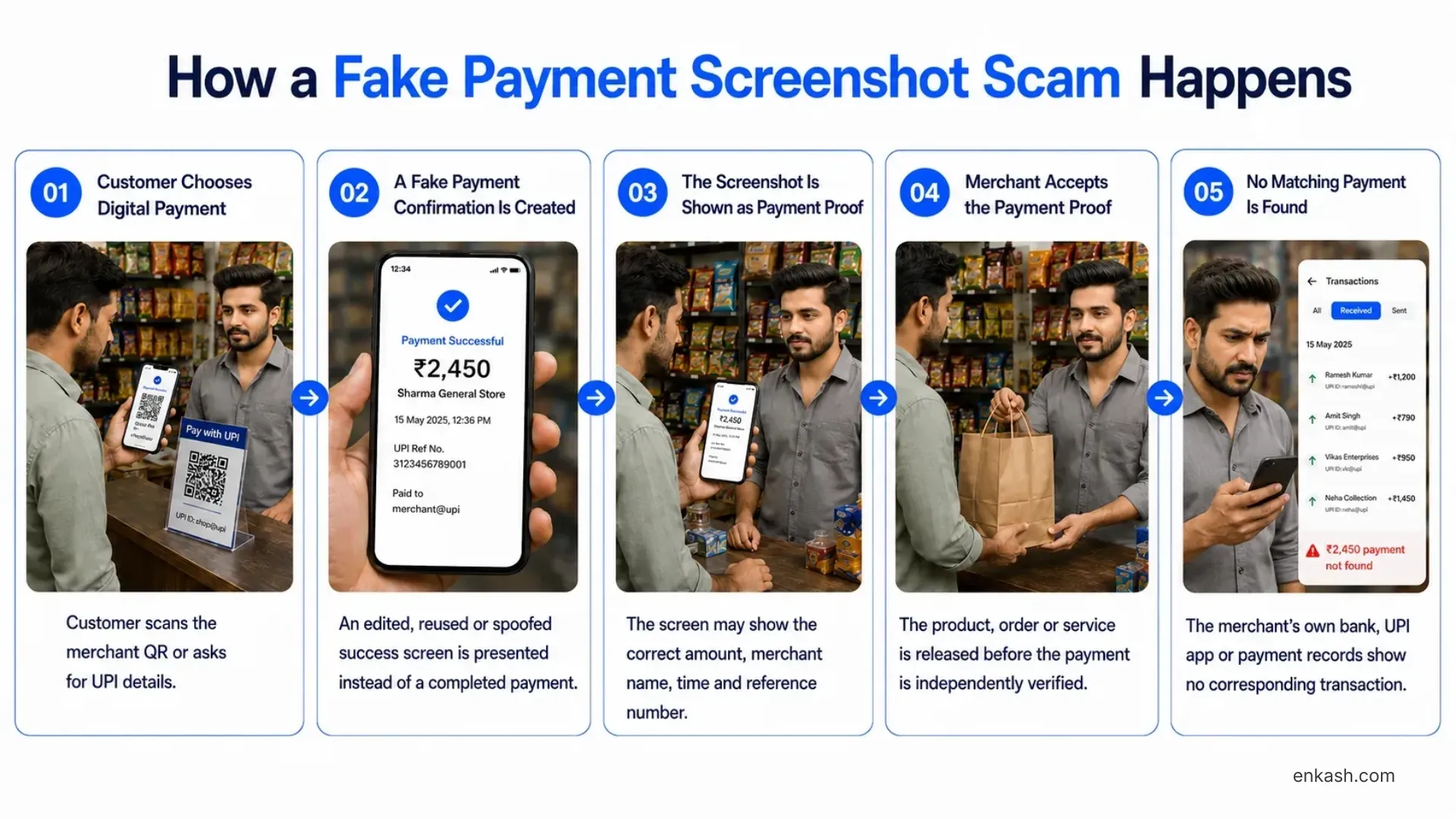
A typical fake payment screenshot scam follows this sequence.
- The customer chooses UPI or another digital payment method.
They may scan the merchant's QR code or ask for the business's UPI ID. - A false payment confirmation is displayed or shared.
The screen may show the exact amount and merchant details. - The fraudster presents it as proof of payment.
They may show the screen directly or send a screenshot through WhatsApp or another messaging app. - The merchant completes the transaction.
The goods are handed over, the order is dispatched or the service is delivered. - No corresponding payment appears in the merchant's records.
Why Do Merchants Fall for Fake Payment Screenshot Scams?
The scam succeeds when a customer’s payment screen replaces the merchant’s own verification process. This can happen when:
- The counter is busy: Staff glance at the customer’s screen and hand over the goods without checking incoming payments.
- Only the owner can verify receipts: Employees accept the screenshot because they cannot access the business’s payment records.
- Orders arrive through WhatsApp: A screenshot is forwarded to the dispatch team and treated as approval to release the order.
- The customer creates urgency: They claim the bank is slow or notifications are delayed and pressure staff to complete the sale.
A genuine payment delay does not automatically mean fraud. If the customer’s screen shows success but your records do not confirm receipt, keep the order pending while the status is checked. Staff who cannot verify payments should involve an authorised colleague before releasing goods or completing the service.
How Are Fake Payment Screenshots Created?
A fake payment confirmation does not always mean someone manually edited an image. Fraudsters can produce convincing payment screens in several ways.
1. Edited Payment Screenshots
A genuine payment screenshot can be modified using basic image-editing tools.
Details such as the amount, recipient name, date, time or transaction reference can be replaced while the rest of the screen remains unchanged.
Because most of the original payment interface is genuine, the manipulated image may be difficult to identify visually.
2. Fake or Spoof Payment Apps
Fake payment apps can imitate the appearance of genuine UPI applications.
These apps may allow someone to enter the merchant name and amount before displaying a false payment success screen. Some can also imitate payment sounds, animations and transaction details.
Read More: Fake payment APK scams.
3. Reused Payment Receipts
A fraudster may show a genuine screenshot from an older or unrelated transaction.
For example, a previous ₹2,000 payment receipt could be presented during another ₹2,000 purchase.
The screenshot itself may be completely genuine, but it does not belong to the current transaction.
4. Fabricated Payment Messages or Receipts
False SMS messages, digital receipts and payment notifications can also be created to imitate a successful transaction.
This is why the appearance of a receipt alone cannot establish whether the merchant actually received the money.
How to Identify and Verify a Fake Payment Screenshot
Some fake screenshots contain visible mistakes. Others can closely resemble genuine payment confirmations.
The best approach is to use visual signs as warnings and verify the actual transaction separately.
Verify the Payment From the Receiving Side
Open your bank app, UPI merchant app or payment dashboard directly. Find the payment associated with the purchase and check:
| Check | What to verify |
|---|
| Payment status | Your own records show a successful incoming payment. |
| Amount | The amount matches the bill. |
| Recipient | The payment belongs to the intended business account. |
| Date and time | The payment corresponds to the current purchase. |
| Payment reference | The reference matches the transaction in your records, where available. |
| Order or invoice | The payment has not already been used to confirm another purchase. |
For payments collected through a payment gateway, check the transaction in the merchant dashboard. Confirmation of a customer’s payment and the later settlement into your bank account are separate stages.
If the payment is missing, pending or inconsistent across records, keep the order pending and check with your bank or payment provider. A delay alone does not prove fraud.
Once you have checked your own records, review the screenshot for the following warning signs.
Check the Payee Details
Check whether the recipient name or UPI ID displayed on the payment proof matches the business receiving the payment.
An incorrect merchant name or UPI ID is an immediate warning sign.
However, correct details do not automatically make a screenshot genuine. A fraudster can copy those details from the merchant's QR code or an earlier payment.
Check the Amount, Date and Time
Compare the screenshot with the purchase.
Look for:
- Incorrect payment amount
- Old transaction date
- Time that does not match the purchase
- Inconsistent information across the receipt
These can reveal a reused or edited payment screenshot.
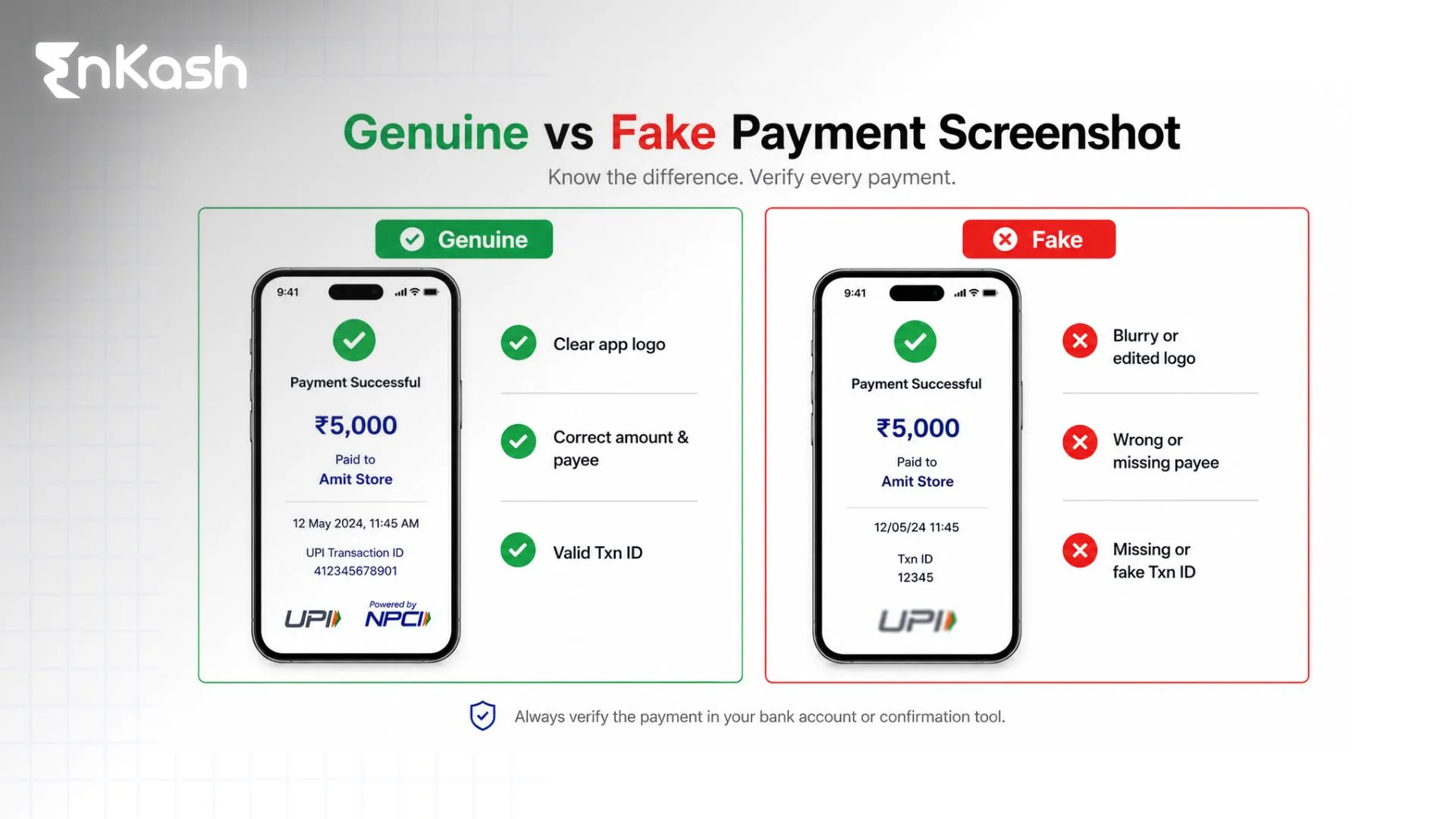
Look for Visual Inconsistencies
Some manipulated screenshots contain:
- Different font sizes
- Misaligned text
- Blurry logos
- Unusual spacing
- Poor-quality icons
- Inconsistent colours
- Missing transaction information
These signs can raise suspicion, but they should not be treated as a foolproof fake-payment test.
Payment applications regularly update their interfaces, and a sophisticated fake may closely copy the original design.
Check the Transaction or Reference Details
A screenshot may contain a transaction ID or reference number.
Do not assume that the presence of a transaction ID makes the payment genuine. The number can be copied or fabricated.
Instead, check whether the transaction can be matched with a payment recorded in your own bank account, UPI application or merchant payment system.
Real vs Fake Payment Screenshot: What Should You Check?
| What to check | Genuine payment confirmation | Fake or misleading payment proof |
|---|
| Record in your account | A matching successful payment appears in your own records. | The screenshot claims success without a corresponding payment. A missing record still needs investigation before concluding fraud. |
| Transaction reference | Matches the relevant payment in your records. | May be invented or copied from another transaction. |
| Amount and recipient | Match the current purchase and intended receiving account. | May show incorrect details—or copy the correct details to appear convincing. |
| Date and purchase | The payment belongs to the current order. | An older genuine receipt may be reused for a new purchase. |
| Visual appearance | Can vary by app, version and image quality. | May contain editing errors, but can also look identical to a genuine confirmation. |
A screenshot’s appearance cannot establish receipt of payment. Always confirm the transaction in your own bank account, UPI merchant app or payment dashboard.
How Can Merchants Prevent Fake Payment Screenshot Fraud?
Businesses do not need employees to become experts at analysing screenshots. A consistent payment process can reduce the chance of accepting false confirmations.
Verify Payments Before Completing the Sale
Make payment confirmation part of the normal checkout process.
For counter payments, confirm the transaction through the merchant's own payment records before handing over the product.
For remote orders, confirm the payment before dispatching the goods or providing the final service.
Set a Clear Payment Verification Process for Staff
Employees should know who can confirm payments, when an order can be released and what to do if the status is unclear.
- Assign verification access: Give authorised staff access to the relevant merchant payment records. If they cannot check a payment, identify an owner or manager who can.
- Confirm before handover: Release goods or approve dispatch only after the payment has been verified against the current bill.
- Record the confirmation: Mark the order as paid and retain the payment reference where available. This helps prevent an earlier receipt from being accepted for another purchase.
- Escalate exceptions: Missing payments, conflicting records and refund requests should go to an authorised person. Customer pressure should not override the verification process.
Give staff a simple response to use while checking: “Please wait while we confirm the payment against your bill.
Use Official Merchant Payment Alerts
A merchant-linked payment notification or soundbox can help staff recognise incoming payments more quickly.
However, employees should recognise which device and payment application belong to the business.
A sound or animation coming from the customer's device should never be treated as confirmation that the merchant received the payment.
Verify Payments Before Issuing Refunds
Fake screenshots can also be used in overpayment scams.
For example, a customer may claim to have paid ₹10,000 instead of ₹8,000 and ask the merchant to return ₹2,000.
Before sending any refund, confirm that:
- The original ₹10,000 payment was actually received.
- The transaction belongs to that customer.
- The amount recorded in the business's account matches the claimed payment.
If the original payment does not exist, sending ₹2,000 would turn a fake screenshot into a real financial loss.
Confirm Online Payments Against the Correct Order
For orders received through WhatsApp, social media or a website, keep payment confirmation separate from screenshots shared by customers.
Use a payment link or an order-linked QR code where supported, then check the payment in your merchant dashboard. Match its successful status, amount and order reference before approving dispatch or delivering the service.
For integrated websites, fulfillment should depend on a verified payment status from the payment provider. A customer’s screenshot or return to a success page should not, by itself, mark the order as paid.
If the status is pending or conflicts with other records, hold fulfilment and investigate through official support. Avoid requesting another payment while the first attempt remains unresolved.
For example, EnKash Payment Gateway supports multiple digital payment methods while giving merchants access to transaction, settlement and reconciliation information through their payment infrastructure.
What Should You Do If You Receive a Fake Payment Screenshot?
Your next steps depend on whether you have already supplied the goods or transferred money. First, check your own payment records to distinguish a suspected fake confirmation from a genuine payment delay.
If You Have Not Released the Order
Keep the order pending until you can verify the payment. If staff cannot resolve the discrepancy, involve an authorised manager or contact the payment provider through official support.
If you suspect deliberate deception, preserve the screenshot and related communications.
If You Have Already Supplied Goods or Services
Save the invoice, customer communications and available CCTV footage. Record what was supplied, its value and when the incident occurred.
Report the suspected fraud through the National Cyber Crime Reporting Portal and approach the local police or cybercrime police station for further assistance.
If no payment was ever made, there is no incoming transfer for your bank to reverse. Explain clearly that goods or services were obtained using false payment proof.
If You Sent Money as a Refund
Contact your bank or payment provider immediately. Call 1930 and report the incident through the National Cyber Crime Reporting Portal.
Provide the details of the actual outgoing payment, including its reference, amount, date and recipient. Distinguish these from the details shown in the fake screenshot.
Prompt reporting may help authorities trace or hold funds, but recovery is not guaranteed.
Read more about steps to take after losing money through a UPI scam.
Keep the Evidence Together
Preserve the original screenshot, chats, invoice, customer contact details, relevant payment records and CCTV footage where available. Retain bank and cybercrime complaint reference numbers for follow-up. Do not delay reporting while collecting every document.
Conclusion
Fake payment screenshot scams work because a false confirmation can look almost identical to the payment screens merchants see every day.
Visual signs such as incorrect fonts, unusual timestamps or mismatched details can help identify suspicious screenshots, but they should not be the final test.
Check the actual transaction in the receiving account or merchant payment system. Train staff to follow the same process for every payment, verify refunds before sending money and preserve evidence if fraud occurs.
A few additional seconds of payment verification can prevent goods, services or money from being handed over against a transaction that never happened.
Frequently Asked Questions
Can a Fake Payment Screenshot Have a Transaction ID?
Yes. A fake or edited payment screenshot can contain a copied or fabricated transaction ID. Match the reference with an actual transaction in your own bank, UPI app or merchant payment records.
Can Fake Payment Apps Imitate PhonePe, Google Pay or Paytm?
Fake or spoof payment apps can imitate familiar payment interfaces and display false success screens. Some may also show transaction details or imitate payment sounds. The receiver's own transaction record should be used for confirmation.
Can You Verify a UPI Payment Using Only a Screenshot?
No. A screenshot can help identify details such as the amount or reference number, but it cannot independently confirm that money reached the recipient. Check the payment through the receiving account or merchant payment system.
What If the Sender Says the Payment Is Successful but I Have Not Received It?
Do not assume fraud immediately. Check your own bank account, UPI merchant app or payment dashboard for a matching payment. If it is missing, pending or inconsistent with the sender’s status, keep the order pending and contact your bank or payment provider through official support. Ask the sender to raise the issue through their payment app. Avoid requesting another payment while the first attempt remains unresolved, as this could result in duplicate payment.
Can a Screenshot Checker Detect a Fake Payment?
A screenshot checker may flag signs of image editing, but it cannot confirm whether money reached your account. Verify the transaction in your own bank account, UPI merchant app or payment dashboard. Do not share banking credentials, OTPs or UPI PINs with a screenshot-checking website or app.
Can Fake Payment Screenshots Be Used for Refund Scams?
Yes. A fraudster may claim to have overpaid and ask the merchant to refund the difference. Verify the original incoming payment before sending any money back.
Where Should Fake UPI Payment Fraud Be Reported?
Report suspected fraud through the National Cyber Crime Reporting Portal. If you transferred money to the fraudster, contact your bank or payment provider immediately and call 1930. If goods or services were obtained using false payment proof, preserve the evidence and approach the local police or cybercrime police station. Clearly explain whether money was transferred or goods were supplied without payment.
Is Creating or Using a Fake Payment Screenshot Illegal?
Using false payment proof to deceive someone into providing goods, services or money can attract criminal liability depending on the facts of the case. Preserve the available evidence and report deliberate fraud to the appropriate authorities.