Choosing a UPI QR code is not only about accepting the payment. It is also about recording the right amount, matching the receipt to the bill, and confirming the transaction quickly. A reusable code may be enough at a counter where staff confirms every receipt. A dynamic QR is more useful when the payable amount and order reference need to travel with the payment and feed into a connected billing or reconciliation system.
Both formats accept UPI payments, but they provide different levels of control over amount entry, order matching, and reconciliation. Wrong amounts, unverifiable payment screenshots, and unmatched receipts create more work as transaction volumes increase. The choice should depend on how the business raises bills, verifies payments, integrates its systems, and reconciles collections.
What is a Static UPI QR Code
The same image can be used for payment after payment because a static UPI QR code contains fixed merchant details, including the payee name and UPI payment address. It is designed for repeated use, and the customer generally enters the payable amount unless the implementation provides another amount-setting mechanism. The customer scans the code, verifies the merchant name shown in the UPI application, enters the amount where required, and authorises the transaction.
A basic static QR usually requires less technical integration than a dynamic QR setup. A small retailer can begin collecting without connecting billing software, but staff may still need to match each receipt to the correct bill.
What is a Dynamic UPI QR Code
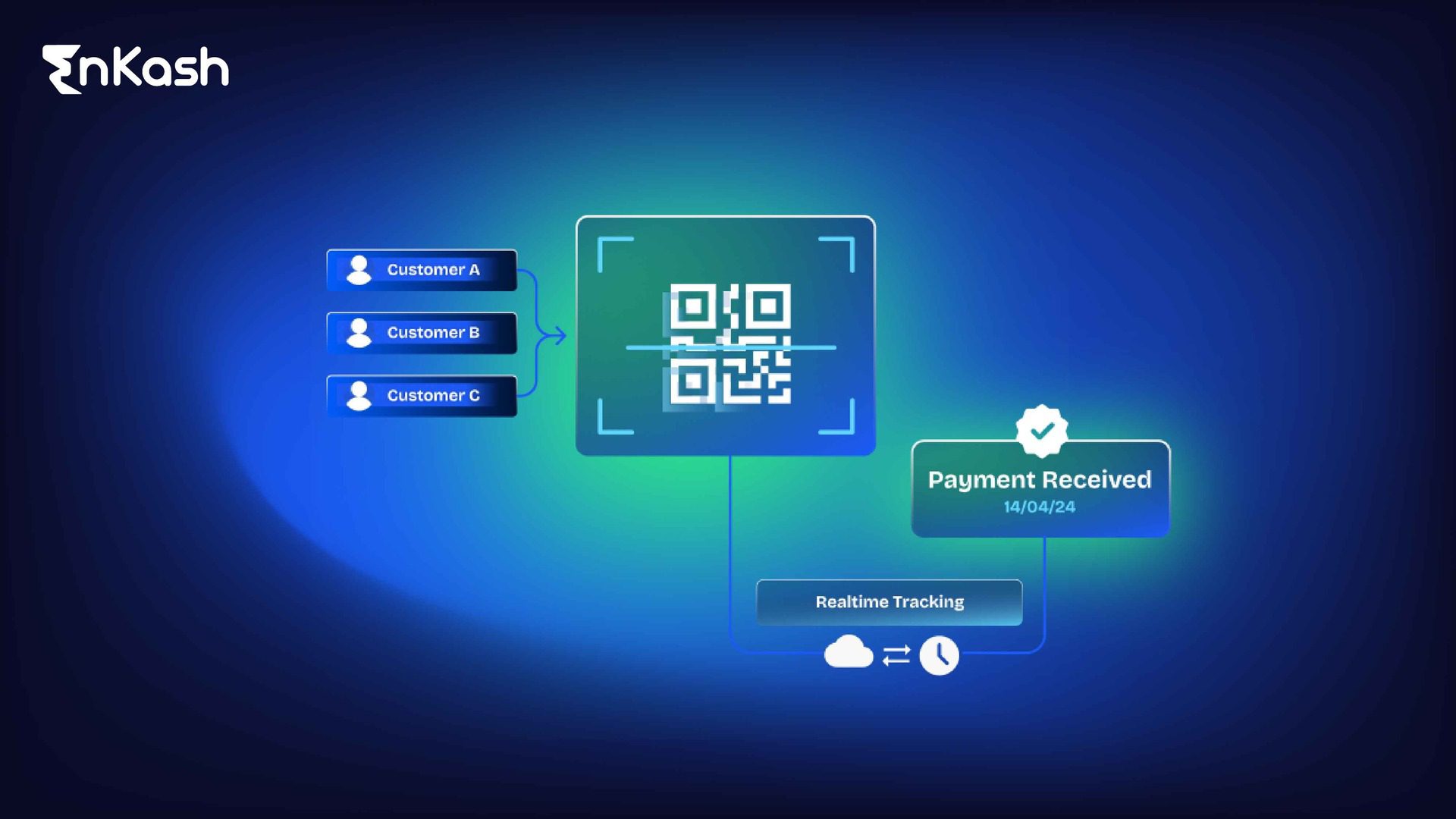
A dynamic UPI QR code is generated for a specific payment request and can include the merchant details, a transaction reference and a non-editable amount. Depending on the provider and integration, the request may also have an expiry time or single-use control. The customer can review those details before authorising the payment.
The code may be generated through billing software, a point-of-sale system, an application, an API or an online checkout, a point-of-sale system, an application, or a web checkout. A dynamic QR can carry a transaction reference that allows a connected billing or payment system to match the receipt with the order that generated it.
How Each QR Payment Flow Works
Customer authorization is required in both flows. The practical difference lies in how much payment information is linked to the bill and carried into reconciliation.
Static QR Payment Flow
- Staff places the reusable merchant code where customers can scan it.
- The customer opens a UPI application and scans the image.
- The application shows the merchant name for verification.
- The customer types the amount due.
- Staff checks the merchant application, bank account or payment system to confirm receipt.
- The finance team later matches the receipt to the correct bill.
Without a built-in reference, staff may have to rely on the amount, payment time, available transaction details, or a note recorded at the counter. The UPI working guide explains the wider payment path.
Dynamic QR Payment Flow
- The billing system opens a record for the sale or order.
- It generates a fresh dynamic QR code carrying payment-specific details.
- The customer sees the merchant and amount already filled in.
- The customer authorises the payment through a UPI application.
- The provider sends the transaction status back.
- The integrated system matches the successful payment with the related order.
Where the provider supports expiry and the merchant system is integrated accordingly, an old request can be closed automatically and marked as expired in the related order record.
Dynamic vs Static UPI QR Code
The table compares the payment information, integration requirements and operational workload associated with each QR format. The final feature set and applicable charges will vary according to the provider selected.
| Comparison Point | Static UPI QR | Dynamic UPI QR |
|---|
| QR creation | One image used repeatedly | A new code for each request |
| Amount entry | Typed by the customer | Included in the request |
| Transaction reference | Captured separately | Can be embedded in the code |
| Reuse | Designed for repeat scans | May expire after payment |
| Error exposure | Mismatches need staff correction | Prefilled data limits entry mistakes |
| Billing integration | Can operate independently | Connects with the billing system |
| Reconciliation | Receipts matched by staff | Orders mapped automatically |
| Reporting | Basic payment records | Order-level transaction context |
| Scalability | Straightforward counter collections | Structured flows for higher volumes |
| Setup effort | Low | Integration and testing required |
| Operating cost | Depends on the provider | Platform charges may apply |
| Fraud controls | Checks on the displayed code | References and expiry add controls |
| Ideal use | Flexible, low-volume collections | Billing-led and branch operations |
Which QR Code Suits Different Business Models
Payment volume alone should not determine the QR format. The stronger deciding factors may be how bills are raised, what finance teams need to report, and how failed or mismatched payments are resolved.
Small Shops, Professionals, and Low-Volume Collections
A reusable UPI QR code for business can suit a shop, independent professional, or another low-volume operator when the owner sees most collections and only a few receipts need matching. Merchant-name checks and a daily settlement review remain necessary.
Restaurants, Clinics, Education, and Invoiced Services
Restaurants, clinics, education providers, and other invoiced services know the bill amount and customer reference before collection. A separate code for that bill reduces wrong-amount payments and helps accounts teams trace exceptions without handwritten notes.
High-Volume Retail and Multi-Counter Operations
Several cashiers collecting at once need a controlled link between the bill and the payment, plus a status they can see quickly. Point-of-sale integration records each receipt to its sale, giving the closing team cleaner reports.
Online, App-Based, and Omnichannel Businesses
Online and app-based businesses cannot rely on staff checking a shared display. A dynamic QR code gives every order a fresh payment request, and the returned status can trigger confirmation, fulfillment, refunds, or exception handling.
Business Benefits and Limitations
| Static QR | Dynamic QR |
|---|
| Requires little integration to deploy. | Prefilled amounts reduce typing mistakes. |
| One displayed code accepts repeated collections. | Embedded references help systems match receipts. |
| Payment collection can begin without billing software. | Status updates can feed connected workflows. |
| Staff checks grow as transaction volume rises. | Setup requires integration and testing. |
| Unmatched receipts need manual follow-up. | Provider disruption calls for a fallback process. |
The option with the lowest initial setup cost may not have the lowest operating cost. A basic printed QR may require significant manual matching, while a well-integrated dynamic flow can reduce reconciliation effort.
Security and Reconciliation Considerations
Staff should confirm a successful payment through the merchant’s bank, payment application, or integrated system rather than relying on the customer’s screen. A displayed QR code proves only where the customer was asked to pay. A screenshot on the customer’s phone should not be treated as conclusive proof that the merchant received the money.
- Ask customers to verify the merchant name displayed in their UPI application before authorising payment.
- Inspect printed QR codes regularly for tampering or unauthorised replacement.
- Verify successful transactions in the merchant’s bank, payment application, or integrated system rather than accepting screenshots.
- Restrict QR generation, cancellation, refund, and reporting permissions according to employee roles.
- Investigate duplicate payments, short payments, excess payments, payments against expired requests, and unmatched receipts..
- Reconcile settlement reports with internal records and bank credits.
- Give each branch or counter a distinct reporting identity.
- Maintain an approved fallback payment method for network, device or provider outages..
These controls make merchant QR payments safer, but neither format eliminates fraud on its own. QR payment security guidance can support staff training.
Implementation Checklist
- Record normal daily volume and the busiest periods at each counter.
- Decide which order, invoice, or customer reference is needed for matching.
- Check whether the existing billing software supports the proposed setup.
- Compare reusable, fixed-amount, expiring, and single-use formats.
- Run acceptance tests across major UPI applications.
- Decide how the final payment status will reach staff.
- Write the process for refunds and duplicate payments.
- Assign responsibility for daily payment verification, settlement review and unresolved exceptions.
- Maintain an approved fallback payment method for outages and integration failures.
- Compare integration cost against the time now spent on manual reconciliation.
Conclusion
Static QR codes work well where staff can verify each payment and manual bill matching remains manageable.
A dynamic QR is generally better suited to situations where the amount, order reference and payment status need to pass into a connected billing or reconciliation system. The better format is the one that leaves a clear trail from the bill raised to the payment received and reconciled.
FAQs
Can a dynamic UPI QR code be generated without a physical POS machine?
A physical point-of-sale machine is not required. Billing software, a payment application, website checkout, or a provider API can create the code and display it on a phone, tablet, monitor, printed bill or customer-facing screen. Setup depends on the provider and integration method.
What happens when a customer pays the wrong amount through a static QR?
First verify the successful transaction in the merchant’s records and match it to the intended bill. The business should preserve both transaction references against the same bill. Where the customer has paid extra, the business should follow its documented refund process and return the excess through a traceable payment route.
Can one merchant QR code accept UPI payments funded by a RuPay credit card?
Eligible customers can use a supported RuPay credit card linked to UPI at compatible static or dynamic merchant UPI QR codes. Availability depends on the merchant category, acquirer enablement, issuing bank, UPI application and current network rules. Person-to-person transfers, P2PM transactions and cash withdrawals are not permitted through this facility.
Should different business branches use separate UPI QR codes?
Separate codes make branch reporting, settlement checks, accountability, and incident control clearer. A shared code can support centralised collections only if another reliable field identifies the originating branch, counter, invoice or customer account..
Can an expired dynamic QR code be scanned and paid again?
That depends on the provider’s expiry configuration. A correctly enforced time-bound or single-use code should reject payment after expiry. Merchants should test the customer journey and issue a fresh request instead of asking the customer to retry an old image.