God is in the details.
That’s a philosophy we follow while building or improving a feature at EnKash.
This month’s releases reduce repeated work across payment monitoring, settlement distribution, receipt review, travel claims and expense settlement.
The latest updates across EnKash Payment Gateway and Expense Management are designed to improve payment visibility, simplify reimbursements and reduce manual finance work.
The updates help finance teams review payment performance, automate multi-party settlements and maintain complete expense records.
Let's have a look.
Payment Gateway
Review collections, failures and settlements with the new Summary Card
See key payment metrics as soon as you log in.
The finance managers start their day looking for answers to these questions — How much was collected? Have settlements been processed?
These questions are answered in one place now with the new Summary Card. Instead of opening separate reports, teams can review the key figures directly from the dashboard.
The Summary Card displays total collections, successful payments, failed payments, refunds and settlement value.
It is designed to give finance teams a quick snapshot of payment performance without opening separate payment and settlement reports.
This helps finance teams identify payment issues and confirm settlement status sooner.
Automatically distribute one payment with Split Settlement
A customer may make one payment, but a platform may need to distribute that amount among several stakeholders
When a payment is made, that amount is further distributed between multiple stakeholders, including the platform, seller, and service or logistics partner. It may sound easy but managing these allocations manually at scale is time-consuming and prone to errors.
That's where Split Settlement can help.
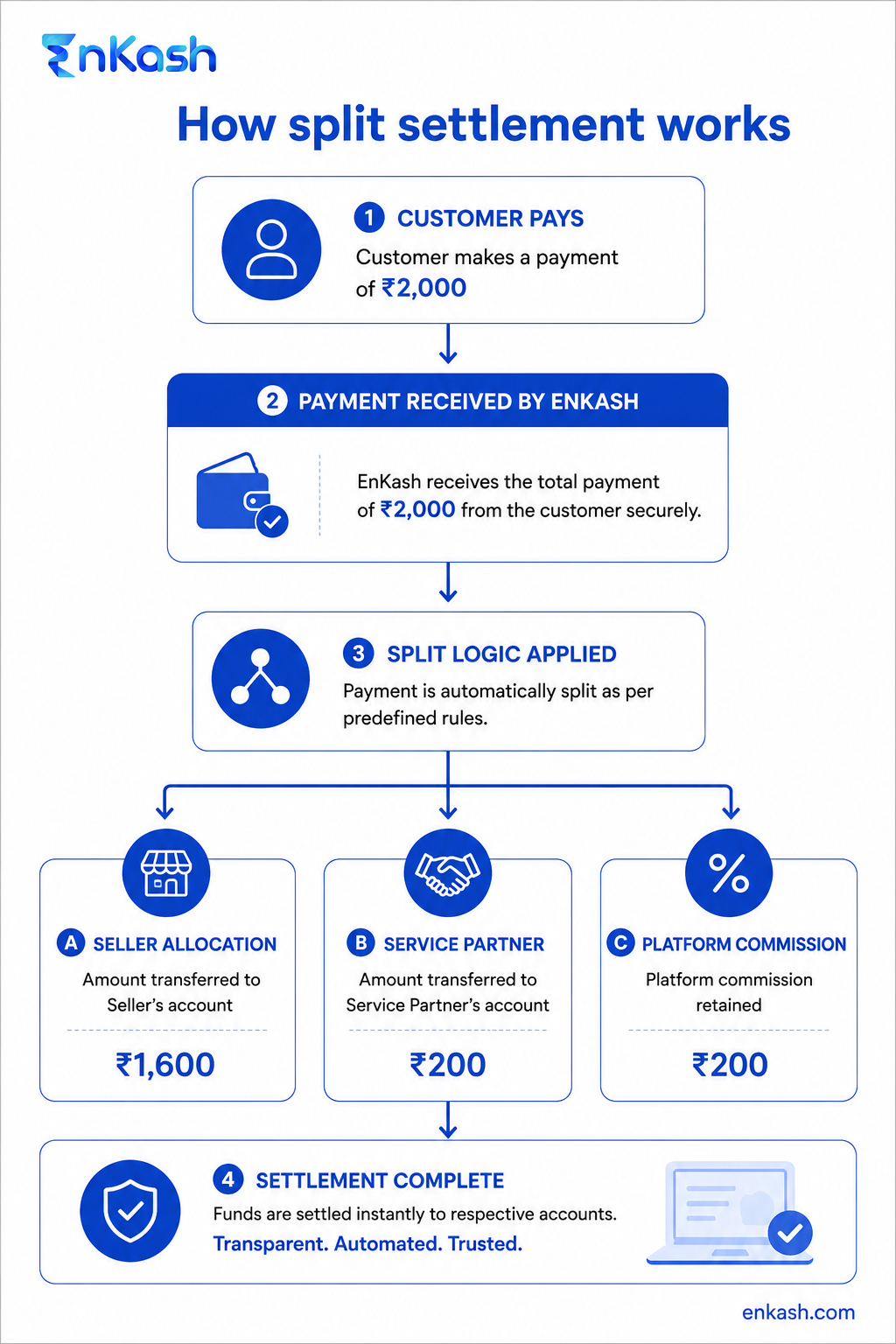
EnKash Split Settlement automatically divides a customer payment according to predefined rules. The seller’s share, partner allocation, and platform commission are calculated according to the configured rules, reducing manual allocation work.
This reduces manual calculations and gives finance teams a clearer record for settlement review and reconciliation.
Let’s understand with an example:
Consider a marketplace that collects one payment from a customer. That payment may include the seller’s share, the logistics partner’s fee and the platform’s commission. With Split Settlement, the marketplace can configure how the amount should be divided and apply those rules when the payment is processed.
Expense Management
Expense delays often begin with small gaps in submission, review, and settlement.
More often, delays come from recurring issues: unclear receipts, incomplete travel records and missing settlement documents that go missing during settlement.
The following updates address these steps directly.
Zoom into receipts before submitting an expense
Every receipt deserves a closer look.
Looking at a blurry receipt is frustrating, and using it to file expenses is even more exhausting. This can lead to incorrect entries, follow-up questions, or avoidable claim rejections.
With Zoom Invoice, employees can enlarge an uploaded invoice or receipt while preparing an expense claim.
This can help employees catch incomplete or incorrect entries before the claim reaches the approver.
Understanding with an example:
An employee uploading a photographed restaurant bill can enlarge the image within the expense form and check the date and total before entering the claim details. The employee does not need to download the image or open it in a separate application.
Record multi-stop journeys for travel reimbursement
Employees literally go far and beyond to reach the client.
An employee may travel from the office to one client location, and then there is another visit and then head back, all within the same day. A single-destination claim form may not accurately represent a journey involving several stops.
We decided it’s time to change this with our enhanced Travel Request feature.
Employees can now record multiple stops throughout their journey, capture their current location, select their mode of transport, and submit travel claims based on the locations and stops recorded during the journey.
EnKash applies the organisation’s configured per-kilometre rate to eligible distance-based claims.
This gives employees a clearer way to document the journey and gives finance teams more information for reviewing the claim.
Attach supporting documents during expense settlement
Expense approvals don’t mean the process has ended.
After approval, finance teams may still need to add payment proof or other settlement records. Previously, this could require a separate document request or upload step.
With the Finance Attachment feature, finance teams can now upload these documents directly during the settlement stage itself.
The uploaded document remains linked to the relevant expense record, making the document easier to retrieve during reconciliation or an audit.
Goal Is To Simplify Everyday Finance Tasks
All these features reflect our commitment to: What can we make easier today?
That can mean bringing key payment metrics into the first dashboard view. It can also mean automating how a payment is allocated among several stakeholders. It also means allowing employees to enlarge a receipt within the expense workflow before submission.
Together, these updates address recurring gaps across payment monitoring, settlement and expense management. And that's exactly how we believe great products evolve; one meaningful improvement at a time.