For a small business, a cybersecurity incident rarely stays confined to a computer screen. A compromised email account can lead to a fraudulent payment. An infected laptop can interrupt customer service. A poorly secured website can expose customer information and damage the trust that took years to build.
The problem is not always a lack of security software. Small businesses often depend on a handful of people, shared accounts, third-party services, and informal processes to keep everything running. Those arrangements make work faster, but they can also give attackers an easy way into the business.
You do not need an enterprise-sized security team to reduce these risks. You do need to understand where your business is most exposed, which failures would hurt the most, and how to respond before a minor incident becomes an expensive one.
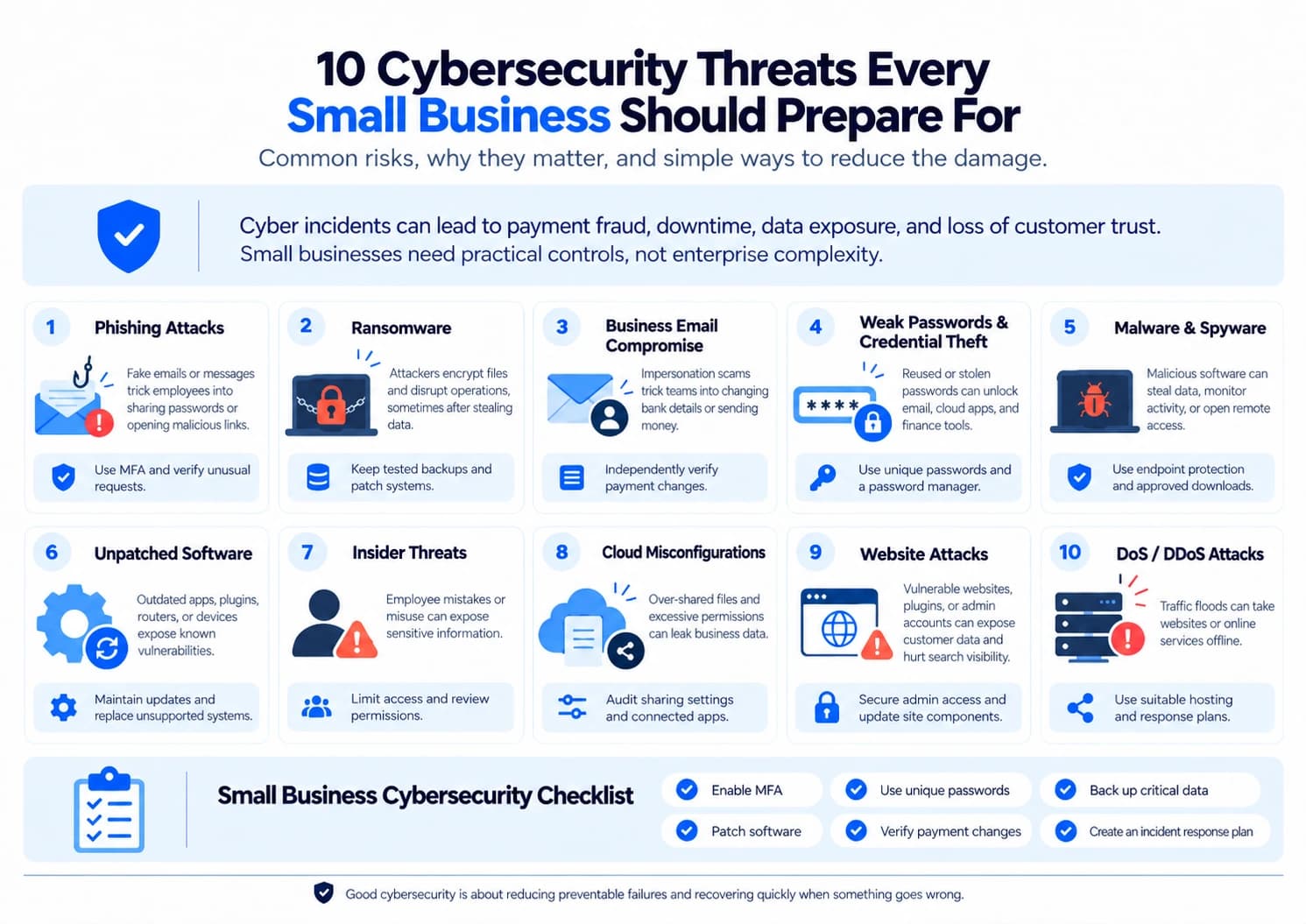
Here are 10 cybersecurity threats worth preparing for, along with practical ways to reduce their impact.
1. Phishing Attacks
Phishing works because it takes advantage of normal business activity. Employees expect invoices, delivery updates, password notifications, and messages from customers. An attacker only needs to make one fraudulent message look convincing enough to trigger a familiar response.
Consider a small company waiting for a payment from a client. An employee receives an email that appears to come from the client's accounts department, asking them to open an attached invoice. The attachment leads to a fake login page, where the employee enters their business email password. The attacker now has credentials that may unlock much more than an inbox.
Phishing messages can also arrive through text messages, social media, messaging apps, and fake websites. Some are poorly written, but others copy a supplier's branding, use a familiar name, or refer to a genuine business transaction.
How to protect your business: Train employees to verify unexpected requests rather than simply look for spelling mistakes. Enable multifactor authentication (MFA), use email security filtering, use a phishing link checker, and make it easy for staff to report suspicious messages. For payment requests or sensitive account changes, confirm the request through a separate, trusted communication channel.
The important measure is not how many suspicious emails your team deletes. It is whether an employee knows what to do when a convincing message arrives at the busiest point of their working day.
2. Ransomware Attacks
Ransomware can prevent a business from accessing its own files, applications, and systems. Attackers encrypt data and demand payment for a decryption key. Some also steal confidential information before encrypting systems and threaten to release it if the business refuses to pay.
For a small business, the consequences extend beyond the ransom itself. Imagine a distributor whose order records, invoices, inventory data, and customer contact details become unavailable on the same morning. Even if the website remains online, the team may be unable to fulfil orders or determine which payments are outstanding.
Ransomware can enter through malicious attachments, stolen credentials, vulnerable remote access services, or compromised software. Once inside, it may spread to shared folders and connected systems if access controls are weak.
How to protect your business: Maintain regular backups of critical data, with at least one copy kept offline or protected against alteration. Test whether those backups can actually restore your systems. Keep software patched, restrict administrator privileges, secure remote access, and use reputable endpoint protection.
If ransomware is suspected, disconnect affected devices from the network where safe to do so, preserve relevant evidence, and contact your IT or incident response provider. Avoid rushing to pay a demand. Payment does not guarantee that files will be restored or stolen information deleted.
A useful test is to ask how long your business could operate without its main files. If nobody knows, your recovery plan needs attention before an attack occurs.
3. Business Email Compromise (BEC)
Business email compromise is particularly dangerous because it can look like an ordinary business transaction. Criminals impersonate a business owner, finance manager, employee, or supplier to persuade someone to transfer money or disclose sensitive information.
Unlike a typical phishing attack, a BEC message may not contain an obvious malicious attachment or link. The attacker might use a compromised email account, a lookalike domain, or information gathered from public company websites and previous correspondence.
For example, a small business receives a message that appears to come from a regular supplier. The email explains that the supplier has changed banks and asks the accounts team to update the payment details before the next invoice is settled. The invoice is genuine, the amount is expected, and the timing makes sense. Only the bank account belongs to the criminal.
How to protect your business: Require independent verification before changing supplier bank details, payroll information, or payment instructions. Call a previously verified phone number rather than the number included in the request. For larger transfers, require approval from a second authorised person.
Secure business email with MFA and review mailbox forwarding rules and account access when suspicious activity occurs.
Small businesses should pay particular attention to informal approval processes. When one person can request, approve, and release a payment without a second check, a convincing impersonation can become a financial loss within minutes.
4. Weak Passwords and Credential Theft
Passwords remain a common route into business systems, especially when employees reuse the same credentials across several services. If attackers obtain a password from one compromised website, they may try it against business email, cloud storage, accounting software, and other accounts.
This is known as credential stuffing. Attackers can also steal credentials through fake login pages, malware, or previously exposed databases.
The real danger lies in the connections between accounts. Access to a business email account may allow an attacker to reset passwords elsewhere, impersonate employees, read confidential discussions, or intercept invoices. A single compromised identity can therefore affect several parts of the business.
How to protect your business: Use a password manager to create and store unique passwords. Enable MFA or passkeys where supported, particularly for email, banking, cloud services, and administrator accounts. Remove unused accounts and revoke access promptly when employees or contractors leave.
Do not rely on a password-change policy alone. Frequent forced changes can encourage predictable patterns if they are not tied to a security need. Change compromised passwords immediately and investigate whether the same credentials were used elsewhere.
Business owners should also secure their own accounts carefully. An owner’s email account often has broader access to financial, administrative, and customer systems than an ordinary employee account.
5. Malware and Spyware
Malware is software designed to perform harmful or unauthorised actions on a device. It includes programs that steal information, record keystrokes, give attackers remote access, or download additional malicious software. Spyware is particularly concerning because it can collect information without obvious signs of infection.
A small business may introduce malware through a fake software installer, an email attachment, a compromised website, or an application downloaded from an untrusted source. An employee searching for a free tool to convert documents, for example, might install a program that also steals browser passwords.
The infection may not immediately shut down the computer. It could quietly collect saved credentials, monitor activity, or send sensitive information outside the business.
How to protect your business: Use reputable endpoint protection, keep operating systems and applications updated, and restrict the installation of unauthorised software. Employees should use approved sources for downloads and avoid connecting unknown USB devices to business computers.
Pay attention to unexplained browser changes, unfamiliar applications, unusual security alerts, and unexpected network activity. These signs do not automatically prove malware is present, but they deserve investigation.
If a device appears compromised, avoid using it to access banking or administrative accounts. Isolate it from the network when appropriate and ask a qualified technician to investigate before returning it to normal use.
6. Unpatched Software and Security Vulnerabilities
Every piece of business software has a maintenance requirement. Operating systems, routers, accounting applications, website plugins, and other tools may receive updates that correct security flaws. When those updates are delayed, attackers can target weaknesses that are already publicly known.
Small businesses often overlook less visible systems. A rarely used computer, an old router, an abandoned website plugin, or a device running an unsupported operating system may remain connected long after anyone remembers who is responsible for it.
The problem is not simply that outdated software is old. It is that the business may no longer receive fixes for newly discovered vulnerabilities, leaving the system exposed even when employees behave responsibly.
How to protect your business: Keep an inventory of business devices, software, websites, and internet-facing services. Assign responsibility for updates, enable automatic updates where appropriate, and prioritise security patches for actively exploited or critical vulnerabilities. Replace unsupported systems when they can no longer be secured adequately.
For a business website, include its content management system, themes, plugins, hosting configuration, and administrative accounts in the maintenance routine.
A practical approach is to review the systems that could cause the greatest disruption if compromised, rather than treating every update as equally urgent. Security advisories and the business's exposure should guide priorities.
7. Insider Threats
Not every security incident begins with an outside attacker. Employees, contractors, and other trusted users can expose information accidentally or misuse their access deliberately.
An employee might send a customer spreadsheet to the wrong recipient, upload confidential documents to a personal cloud account, or lose a device containing unprotected business information. In other cases, a disgruntled employee may download company data before leaving.
Small businesses can be especially vulnerable when several employees share one login or when access is granted informally. These practices make it difficult to determine who accessed a file, remove access from the right person, or identify how information left the organisation.
How to protect your business: Give each person an individual account and access only to the systems and information needed for their role. Review permissions when responsibilities change, and remove access promptly when employment or a contract ends. Protect sensitive files and monitor access to important systems in a proportionate, transparent way.
Create a straightforward reporting process so employees can admit mistakes quickly without fearing automatic punishment. Early reporting can give the business time to revoke a shared link, reset credentials, contact the wrong recipient, or contain an incident.
The aim is not to treat employees as suspects. It is to make sure that a single mistake, an account compromise, or an individual acting improperly cannot expose the entire business.
8. Cloud Security Misconfigurations and Data Exposure
Cloud services make it possible for small businesses to manage files, collaborate with remote employees, and run applications without maintaining extensive infrastructure. However, moving information to the cloud does not automatically make it secure.
A common problem is excessive access. A folder intended for a small internal team may be shared with anyone who has its link. A former contractor may retain access to business documents, or a cloud application may have permission to read far more data than it needs.
These problems can remain unnoticed because the service continues to work normally. The business may discover the exposure only after confidential documents appear in the wrong place or an unauthorised user accesses a file.
How to protect your business: Review sharing settings, remove unnecessary permissions, enable MFA, and audit accounts and connected applications regularly. Restrict public access to sensitive information and enable available security logs and alerts. Use the cloud provider's configuration guidance rather than assuming default settings suit every business.
Responsibility is shared between the service provider and the customer. A provider may secure its underlying infrastructure, but the business still needs to manage its users, permissions, data, and account settings.
For a small team, a quarterly review of cloud access can be a useful starting point, with more frequent checks for highly sensitive information or after staffing changes.
9. Website Attacks and Web Application Vulnerabilities
A business website may be more than a marketing channel. It can collect enquiries, accept bookings, process payments, store customer information, and connect to other business systems. A compromise can therefore affect both online visibility and daily operations.
Attackers may exploit vulnerable content management systems, outdated plugins, weak administrator passwords, or flaws in custom applications. Common techniques include SQL injection, which targets database queries, and cross-site scripting (XSS), which can cause malicious scripts to run in a user's browser under certain conditions.
For businesses that depend on organic search, a website compromise can create another problem. Attackers may inject spam pages, add unwanted redirects, modify content, or abuse the site to distribute malicious material. Owners might initially notice unexplained search results or browser warnings rather than a clear security alert.
How to protect your business: Keep the website platform, themes, and plugins updated. Remove extensions that are no longer needed, secure administrator accounts with MFA, and use a web application firewall where appropriate. Arrange regular security assessments for sites that process sensitive data or support important business operations.
Maintain backups outside the website environment and verify that a clean version can be restored. A backup that includes the same compromised files or database entries may simply reintroduce the problem.
If the website begins redirecting visitors unexpectedly, displaying unfamiliar pages, or generating security warnings, investigate promptly. Preserve evidence, contact your hosting provider or security specialist, and check whether customer data or search visibility has been affected.
10. Denial-of-Service (DoS/DDoS) Attacks
A denial-of-service attack attempts to make a website or online service unavailable by overwhelming it with requests or otherwise exhausting its resources. A distributed denial-of-service (DDoS) attack uses traffic from multiple sources, making it harder to block through simple measures.
For an online retailer, booking service, or small business that generates leads through its website, even a temporary outage can mean missed sales and frustrated customers. The business may also spend time trying to distinguish a genuine attack from a hosting problem, a software fault, or an unexpected increase in legitimate traffic.
Not every sudden traffic spike is malicious. The response should depend on the evidence, the systems affected, and the likely business impact.
How to protect your business: Choose hosting that fits your site's needs, use a reputable CDN or DDoS protection service when appropriate, and monitor availability and traffic patterns. Keep contact details for your hosting provider accessible so you can escalate an incident quickly.
Prepare a basic response plan that explains who will contact the provider, how customers will be informed, and what alternative processes are available if the site remains unavailable.
Small businesses do not always need expensive infrastructure to manage this risk. For many, the first step is confirming what protection their existing hosting plan provides and understanding how to get help during an outage.
How to Build a Cybersecurity Plan for Your Small Business
Knowing the threats is useful, but protection improves when the business turns that knowledge into repeatable habits. A plan should reflect what the company does, what information it holds, and how long it could tolerate losing access to its systems.
Start With the Assets You Cannot Afford to Lose
Identify the systems that keep the business operating: email, accounting software, customer records, payment services, order management, and essential files. Work out who can access each system and what would happen if it became unavailable.
A small consultancy may depend heavily on email and client documents. A retailer may rely on its inventory system and payment platform. Their security priorities will overlap, but they will not be identical.
Enable MFA on email, financial services, cloud platforms, and administrator accounts. Use unique passwords, remove dormant accounts, and limit administrator privileges. These measures can reduce the damage caused by stolen credentials without requiring a large security budget.
Make Backups Part of Recovery Planning
Keep multiple copies of important data and protect at least one copy from being altered or deleted by compromised systems. Where practical, follow the 3-2-1 approach: maintain three copies of important data, on two different types of storage, with one copy stored off-site. An offline or immutable backup can offer additional protection against ransomware.
Test restoration, not just backup completion. A successful backup notification does not prove that the business can recover its accounting records, customer files, or essential applications within an acceptable time.
Give Employees Clear Rules They Can Follow
Security instructions should match real working conditions. Employees need to know how to verify payment changes, report suspicious messages, handle customer data, and request access to new tools. Keep instructions short enough to use when someone is busy or under pressure.
Decide What Happens During an Incident
Document who makes decisions, who contacts technical support, how affected devices are isolated, and who communicates with customers or suppliers. Keep emergency contact details somewhere accessible even if the main email system is unavailable.
Depending on the incident, the business may also need to contact its bank, insurer, legal adviser, or relevant authorities. Legal and regulatory reporting obligations vary by location, industry, and type of data involved.
Review the Plan as the Business Changes
New employees, cloud applications, payment methods, websites, and suppliers can introduce risks that did not exist when the plan was written. Review access and security arrangements periodically, and revisit them after a significant change or incident.
For businesses without an in-house security specialist, a reputable managed IT or cybersecurity provider can help maintain systems, investigate alerts, and prepare for recovery.
Cybersecurity Checklist for Small Businesses
Use this checklist to identify practical gaps in your current arrangements.
- Multifactor authentication is enabled on important accounts.
- Employees use unique passwords and a password manager.
- Devices, applications, and website components receive security updates.
- Endpoint protection is installed and maintained.
- Critical data is backed up, and restoration has been tested.
- Employees know how to report suspicious messages and security incidents.
- Changes to bank details and payment instructions are independently verified.
- Cloud sharing permissions and third-party application access are reviewed.
- Unnecessary accounts and privileges are removed.
- An incident response plan and emergency contact list are available.
You do not need to complete every item on the same day. Start with the gaps that could expose sensitive information, enable fraudulent payments, or prevent the business from operating. Assign an owner and a deadline to each important fix.
Conclusion
Small business cybersecurity is less about trying to prevent every imaginable attack and more about avoiding preventable failures and limiting the damage when something goes wrong.
A convincing email should not be enough to redirect a supplier payment. One compromised laptop should not destroy every backup. A former employee should not retain access to customer records months after leaving. These are problems that sensible procedures and well-maintained systems can help prevent.
Start with the basics: secure important accounts, keep software updated, protect backups, review access, and make sure employees know how to report a problem. Then build a recovery plan around the systems your business cannot afford to lose.
The most useful security measure is one your business can maintain consistently, not a complicated tool that nobody has time to manage.