What are Flipkart vouchers?
Flipkart voucher is a digital gift code that you can use to pay for products on the Flipkart website or app. These vouchers work like prepaid credit. You enter the code during checkout, and the voucher amount gets deducted from your order. They are easy to use, secure, and suitable for most purchases, whether you are buying electronics, clothing, books, home appliances, or groceries.
You can buy Flipkart vouchers for yourself or gift them to someone else. They are often used for birthdays, festivals, rewards, and special occasions because they let the receiver pick exactly what they want. Each voucher comes with a fixed value and a validity period, which makes them simple to track and redeem. Whether it is for everyday shopping or thoughtful gifting, Flipkart vouchers offer a quick and flexible way to shop online.
How to Add a Flipkart E-Gift Card to Your Account
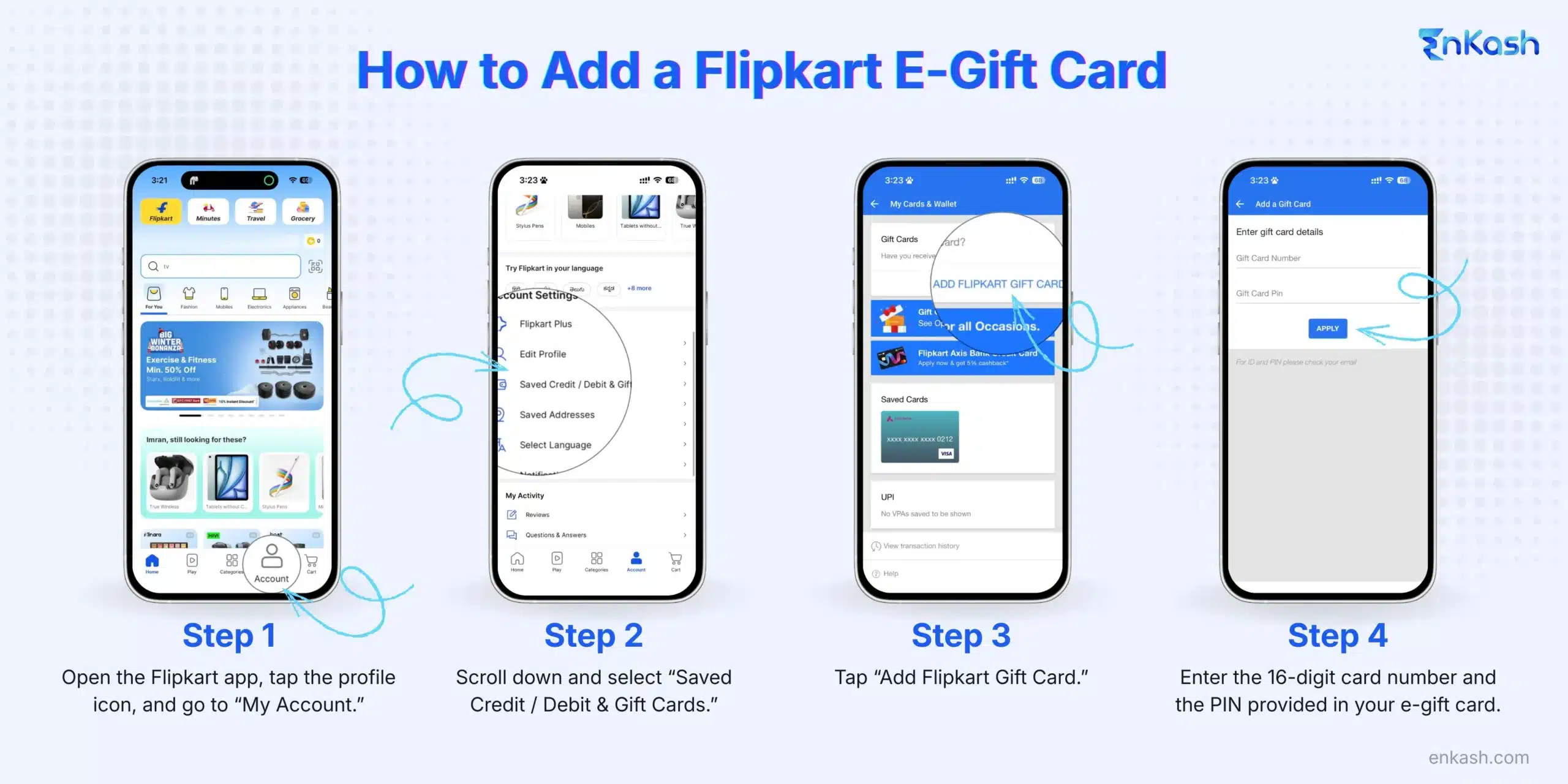
If you have received a Flipkart e-gift card, you can add it to your account in just a few steps. Once added, the amount gets stored in your Flipkart balance and can be used for any eligible purchase. Follow the steps below to add your gift card safely and correctly.
Step 1: Open the Flipkart App and Access Your Account
Start by opening the Flipkart app on your phone. Tap the profile icon at the bottom of the screen and enter the “My Account” section. Make sure you are logged in with the correct Flipkart ID before moving ahead.
Once you are inside the account menu, scroll down until you find the option called “Saved Credit / Debit & Gift Cards.” This section stores all your payment cards and allows you to manage your gift cards.
Step 3: Tap on “Add Gift Card”
Inside this menu, you will see a button that says “Add Gift Card.” Tap this option to begin loading your Flipkart e-gift card.
Step 4: Enter the Gift Card Number and PIN
A small form will appear asking for two details: the 16-digit gift card number and the PIN. Enter both exactly as shown in the email or message where you received your e-gift card. Double-check the details to avoid errors.
Step 5: Add the Gift Card to Your Account
After entering the details correctly, click on “Add to Account.” Flipkart will verify the information and instantly add the amount to your available balance. You can now view it under the same “Saved Credit / Debit & Gift Cards” section.
How to Redeem Flipkart Vouchers Online?
Redeeming Flipkart vouchers online is a straightforward process that allows you to use the voucher’s value towards your purchase.
Step 1: Visit the Flipkart WebsiteStart by visiting the Flipkart website on your preferred device. If you don’t have an account, make one by entering the required information. Enter your login information to access your account if you are already registered.
Step 2: Select Products and Proceed to CheckoutBrowse through the wide range of products available on Flipkart and add your desired items to your cart. Once you’ve added all your items to the cart, head to the payment page.
Step 3: Apply the Flipkart Voucher CodeOn the checkout page, you will find a section to enter your voucher code. Carefully enter the code exactly as it appears, including any hyphens or special characters. Click on the “Apply” button to validate the code.
Step 4: Complete the Payment ProcessAfter applying the voucher code, the value of the voucher will be deducted from your total order amount. Suppose the order total exceeds the voucher value. In that case, you can choose another payment method to cover the remaining amount. Select your preferred payment method, enter the necessary details, and complete the payment process.
Tips and Tricks for Redeeming Flipkart Vouchers
To make the most of your Flipkart vouchers, here are some helpful tips and tricks:
- Use the Full Value of the Voucher: Try to plan your cart so you use most of the Flipkart voucher amount before it expires. If your order value is lower than the voucher amount, the remaining balance usually stays in your Flipkart gift card or wallet and can be used later within the validity period. Always check the terms, as some ‘single-use only’ vouchers may not support partial redemption.
- Check the Expiry Date of the Voucher: Flipkart vouchers come with an expiry date, so it’s essential to check the validity period before redeeming them. Ensure that you use the voucher before it expires to avoid any disappointment.
- Combine Vouchers for Larger Purchases: If you have multiple Flipkart vouchers, consider combining them to make larger purchases. However, don’t forget to check the associated terms and conditions with the respective vouchers. Combining different vouchers doesn’t work every time.
- Keep Track of Your Voucher Balance: To stay informed about your voucher balance, you can check your Flipkart account or contact customer support. This way, you can plan your future purchases accordingly and avoid any unpleasant surprises.
How to Purchase Flipkart Vouchers Online
You can purchase Flipkart vouchers online from EnKash, an online platform for brand vouchers that offers attractive discounts. EnKash offers convenience and a secure payment process, making it easy to purchase vouchers from the comfort of your own home.
How to buy Flipkart vouchers using EnKash?
EnKash is an online gift card platform that offers a seamless and secure way to purchase Flipkart vouchers. With a wide range of brands and denominations available, EnKash provides a convenient one-stop solution for all your gifting needs. To buy Flipkart vouchers on the
EnKash platform, follow these steps:- Visit the EnKash website and sign up or log in if you already have an account.
- You can also hover over the brand vouchers section, select the e-commerce category, and then choose to log in.
- Select Flipkart vouchers from the category.
- Choose the desired voucher value, add it to your cart, and proceed to checkout.
- Provide the necessary details and complete the payment process.
- Once the payment is successful, the Flipkart voucher will be delivered to your registered email address and WhatsApp number.
Benefits of Using Flipkart Vouchers
Using a Flipkart voucher offers several advantages for shoppers.
- Convenience and Flexibility: Flipkart vouchers provide a convenient and flexible payment option, allowing you to shop for your favorite products with ease. Whether you’re buying electronics, fashion, or home appliances, Flipkart vouchers can be used across a wide range of categories, making them suitable for any shopping need.
- Easy Budgeting and Tracking: By using Flipkart vouchers, you can easily manage your budget and track your expenses. Vouchers allow you to allocate a specific amount for shopping, helping you stay within your budgetary limits. Additionally, you can keep track of your voucher balance through your Flipkart account, ensuring that you make informed purchasing decisions.
- Special Discounts and Offers: EnKash offers exclusive discounts and promotions on Flipkart vouchers. By redeeming these vouchers, you can access special deals and save money on your purchases. Keep an eye out for promotional campaigns and seasonal offers to make the most of your voucher.
Conclusion
Redeeming and purchasing Flipkart vouchers online is a simple and convenient way to shop for a wide range of products. By following the step-by-step process outlined in this guide, you can easily redeem Flipkart vouchers and enjoy a seamless shopping experience. Take advantage of the benefits offered by EnKash on Flipkart vouchers, such as flexibility, special discounts, and easy budgeting. Whether you’re buying for yourself or gifting to someone special, Flipkart vouchers are a versatile and practical option. Start exploring the world of Flipkart vouchers today and unlock a world of shopping possibilities.
FAQs
1. Can Flipkart vouchers be used for all products?Flipkart vouchers can be used for most products across categories like electronics, fashion, home, and grocery, but some items and services are excluded as per Flipkart’s terms. However, there may be certain restrictions on specific items or categories. It’s essential to check the terms and conditions associated with the voucher to ensure its applicability to your desired purchase.
2. Can Flipkart vouchers be refunded or exchanged?Flipkart vouchers are generally non-refundable and cannot be exchanged for cash. Once a voucher is purchased or received, it cannot be returned or refunded. It’s crucial to carefully choose the voucher value and ensure its compatibility with your shopping preferences.
3. Can Flipkart vouchers be combined with other payment methods?Yes, Flipkart vouchers can be combined with other payment methods to cover the total order amount. If the voucher value is less than the order total, you can choose an additional payment method, such as a credit card or net banking, to pay the remaining balance.
4. Are Flipkart vouchers transferable?Flipkart vouchers are usually non-transferable and can only be used by the recipient. The voucher is linked to the account associated with the email address provided during the purchase or gifting process. It’s important to keep your voucher details confidential to prevent unauthorized use.
5. What is the validity period of Flipkart vouchers?Flipkart vouchers typically have an expiry date mentioned on them. It’s important to check the validity period before redeeming the voucher to ensure that it is still usable. Once a voucher expires, it cannot be extended or reactivated.
6. Can I partially use a Flipkart voucher and keep the remaining balance?Yes. If your Flipkart voucher has a remaining balance after a purchase, the unused amount stays in your Flipkart account. You can use it on your next order during the validity period. Only vouchers that state “single-use only” cannot be partially redeemed.
7. Do Flipkart vouchers work during sale events like Big Billion Days?Yes. Flipkart vouchers can be used during major sale events, festive offers, and price drops. In fact, using vouchers during sales helps you save more because the discounted sale price is applied first, and then the voucher amount is deducted.
8. Can Flipkart vouchers be added to someone else’s account?If the voucher terms state that the code is not locked to a specific email ID, you can gift it to someone else and they can add it to their Flipkart account. Once redeemed, the voucher is permanently linked to the recipient’s account.
9. How do I check the balance left on my Flipkart voucher?You can view your remaining voucher balance in the “Gift Cards” section of your Flipkart account. If the voucher has been applied to your account, the updated balance will be shown automatically. You may also contact Flipkart support for balance verification.
10. Do Flipkart vouchers expire if I add them to my account but do not use them?Yes. Even if the voucher is added to your Flipkart account, the original expiry date remains the same. The expiry does not extend, so it is better to use the balance before the mentioned date.
11. Can I use Flipkart vouchers to buy subscriptions like Flipkart Plus or warranties?Flipkart vouchers can be used for most digital and service-based purchases on the platform. However, you cannot use them to buy Flipkart Plus subscriptions, Flipkart Gift Cards, or certain third-party services such as some extended warranties. Always check the product policy on the checkout page.